This website is built around a very small architecture. It runs in my house, not in the cloud - sorry, AWS friends.
The objective was not to create another application platform. It was to build a web environment that is easy to understand, easy to isolate and difficult to break.
The architecture
The public web server runs inside a dedicated OpenBSD virtual machine hosted by a Raspberry Pi 5.
The Raspberry Pi acts as the edge layer, while the OpenBSD virtual machine provides the actual HTTPS service from a dedicated virtual network.
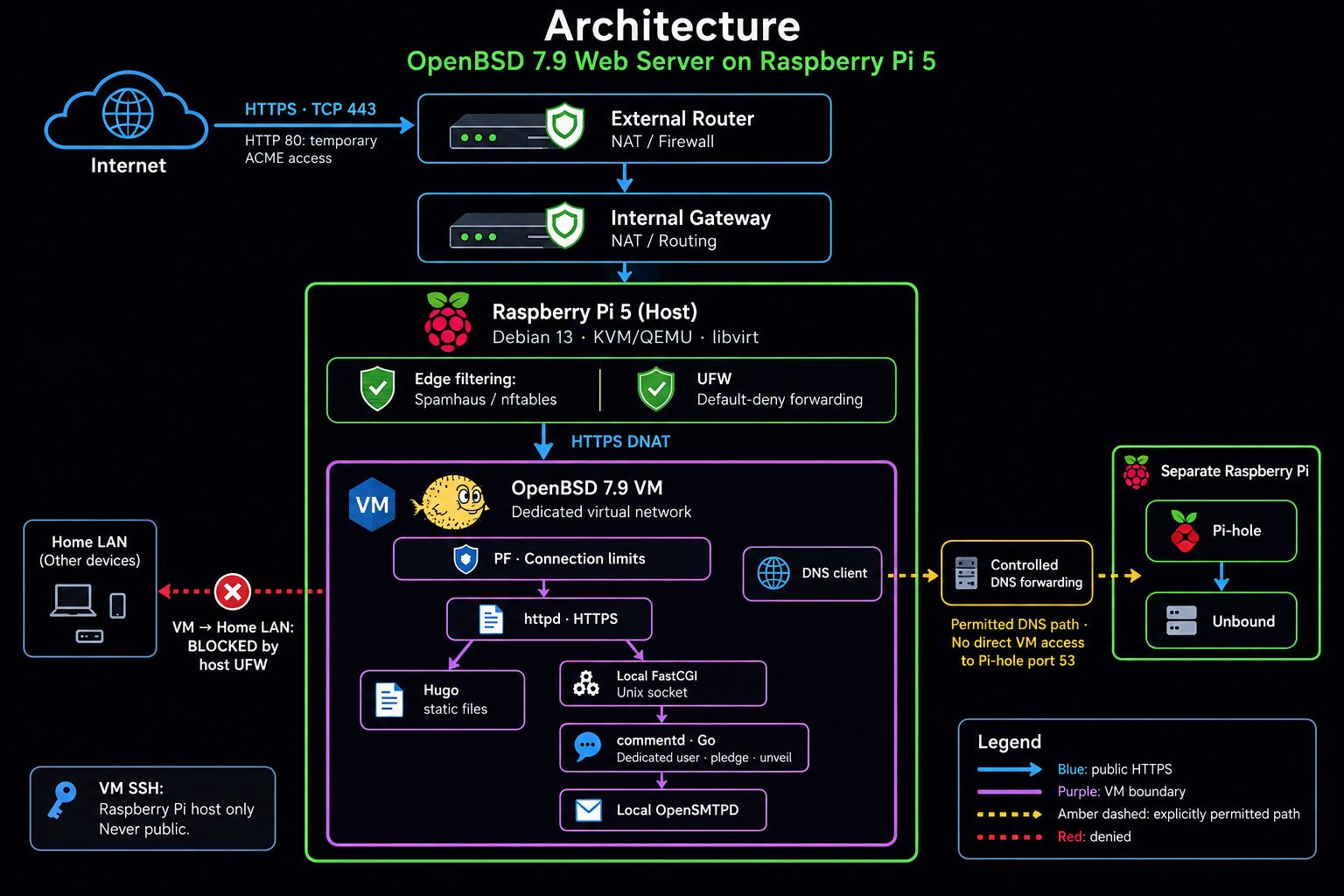
The OpenBSD virtual machine has limited resources:
- 1 vCPU
- 1 GB RAM
- 20 GB virtual disk
The website itself does not require an application server, database or server-side JavaScript runtime.
Hugo generates static HTML, CSS and JavaScript. OpenBSD httpd only has to serve those files.
The Raspberry Pi 5 as the edge layer
The Raspberry Pi 5 does more than simply host the OpenBSD virtual machine.
It also acts as the first security layer between incoming Internet traffic and the web server.
The host firewall is managed using UFW, with only the traffic required by the infrastructure explicitly permitted.
A separate nftables-based reputation filter uses the Spamhaus blocklist to reject known malicious IP addresses before their traffic reaches the OpenBSD server.
Traffic that passes these controls is forwarded using DNAT to the dedicated virtual network containing the OpenBSD VM.
This keeps the public-facing server separate from the Raspberry Pi host itself: the Pi performs the edge filtering and forwarding, while OpenBSD remains responsible for serving the website.
OpenBSD and PF
OpenBSD provides a second, independent filtering layer using its native packet filter, PF.
The web server exposes only the services that are actually required. Administrative SSH access is restricted to the internal network, while HTTPS traffic arriving from the edge is subject to additional PF controls.
For HTTPS, PF monitors the number and rate of TCP connections generated by individual sources.
Sources exceeding the configured thresholds can automatically be placed into a persistent PF table:
https_abusers
Traffic from addresses in that table is then blocked before reaching httpd.
These controls are implemented at the network layer. PF is not trying to analyse URLs or application behaviour; its role is to detect abnormal TCP connection patterns and enforce limits close to the network stack.
The resulting path therefore has multiple independent controls:
Internet
   ↓
External Router
   ↓
Internal Gateway
   ↓
Raspberry Pi 5
   ├── UFW
   ├── Spamhaus / nftables reputation filtering
   └── DNAT
          ↓
Dedicated Virtual Network
          ↓
OpenBSD
   ├── PF connection controls
   └── httpd
The two filtering layers have different responsibilities.
The Raspberry Pi can reject sources already known to be malicious, while OpenBSD independently controls the traffic that actually reaches the web server.
Why not a traditional DMZ?
This architecture is deliberately not presented as a traditional DMZ.
A conventional DMZ would normally place public-facing systems in a separate physical or logical security zone, with explicit filtering between the Internet-facing network, the DMZ and the internal network.
That would provide cleaner network-level separation and would be the preferred approach for a larger production environment or for infrastructure hosting multiple public services.
This environment has a different scale and purpose.
The OpenBSD server is isolated inside a dedicated libvirt virtual network behind the Raspberry Pi 5. Only explicitly forwarded web traffic can reach it, while administrative access remains restricted to the internal network.
The OpenBSD VM also applies its own PF policy independently of the Raspberry Pi edge controls.
Adding another physical network segment and another firewall zone would certainly be possible, but for a single-purpose static website it would increase infrastructure complexity without providing a proportionate operational benefit.
The objective is therefore not to reproduce an enterprise DMZ at home.
It is to maintain clear isolation, minimal exposure and multiple independent filtering layers while keeping the architecture small enough to remain completely understandable.
Why OpenBSD?
The web server has a very small responsibility.
It receives HTTP and HTTPS requests and returns static content.
That makes OpenBSD a particularly interesting fit: the operating system, packet filter and web server form a compact environment without requiring a large software stack.
httpd is intentionally small. It does not attempt to provide the extensive feature set of larger web servers, but for a static Hugo website that is largely an advantage.
The runtime remains simple:
OpenBSD
   ├── PF
   └── httpd
          ↓
     Static files
The VM is also segregated from the rest of the host infrastructure.
If the web server is compromised, the service is not running directly on the Raspberry Pi host and does not share its operating system environment.
Performance
The small architecture does not imply particularly small serving capacity.
A synthetic test was executed using 400 concurrent HTTPS connections.
The VM sustained approximately:
- 2,000 requests / second
- 14 MB/s
- 120,000 requests / minute
At that point the single virtual CPU reached full utilisation.
There were no read errors, write errors or timeouts during the test.
For a personal vintage computing website, this is substantially more capacity than is realistically required.
The performance test was therefore less about finding the maximum possible throughput and more about verifying that the intentionally constrained VM still had a very large margin compared with the expected workload.
Development versus runtime
Another design principle is separation between the tools used to build the site and the software required to run it.
Hugo is the publishing system.
OpenBSD httpd is the runtime.
The site is developed separately and Hugo generates the final static content. Once generated, the result is simply a directory containing HTML, CSS, JavaScript and image files.
The production server does not need the development environment, a database, Node.js or an application framework to answer a web request.
That separation also keeps deployment straightforward:
Source
   ↓
Hugo build
   ↓
Static files
   ↓
OpenBSD httpd
The runtime has very little state and very few moving parts.
That is intentionally boring. And for infrastructure, boring is often good.
How do I monitor it?
A simple website should be monitored in a simple way.
I didn’t need another dashboard, monitoring platform, or management stack just to understand what was happening at the edge of the site (well… I’m using GoAccess..) Instead, I built a small Telegram bot that lets me query the infrastructure directly.
For example, a single command gives me the status of both security layers:
- Raspberry Pi 5 / Spamhaus — packets and traffic rejected by the reputation filter before they reach the VM.
- OpenBSD / PF — IP addresses dynamically blocked by PF based on their connection behaviour.
The two mechanisms are independent: one is reputation-based, the other behaviour-based.
And it works.
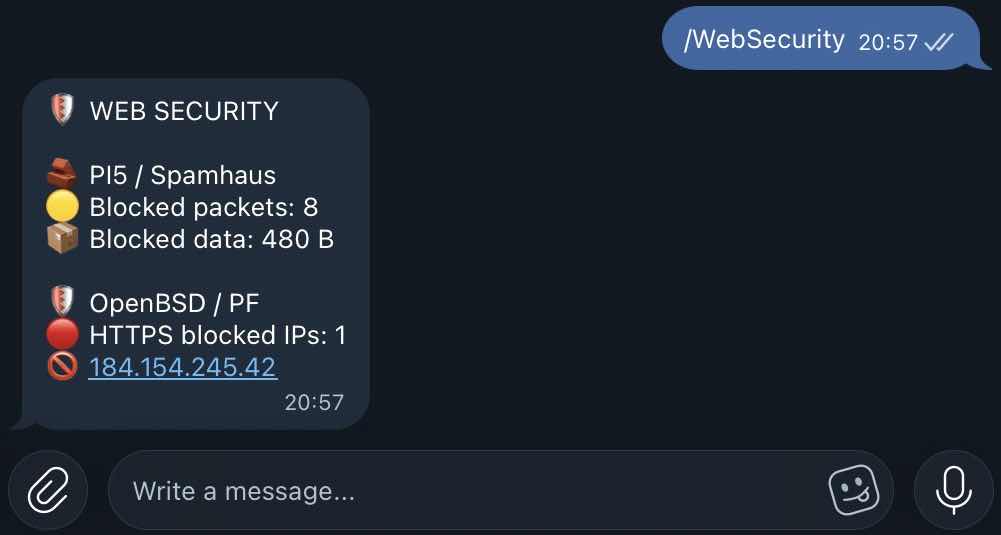
Fun fact : While I was fixing and testing the monitoring described above, the system provided an unexpected real-world test.
At 23:41:29, a remote host started probing the web server.
The first requests looked like this:
GET / HTTP/1.0
OPTIONS / HTTP/1.0
GET /nice%20ports,/Trinity.txt.bak HTTP/1.0
They were followed by malformed requests, protocol probes and requests such as:
OPTIONS sip:nm
GET /devicedesc.xml
In total, only 28 requests reached OpenBSD httpd.
The interesting part happened immediately afterwards.
PF detected the connection pattern, added the source address to the
https_abusers table and flushed its existing states.
From that point on, the traffic never reached the web server.
Because PF logging had just been enabled, I could watch the result in real time:
block in on vio0: 45.79.152.14.8584 > OPENBSD_INT_IP:443: S
block in on vio0: 45.79.152.14.8570 > OPENBSD_INT_IP:443: S
block in on vio0: 45.79.152.14.8592 > OPENBSD_INT_IP.443: S
The scanner continued opening connections and retransmitting packets, but PF was already dropping them.
A few moments later, the monitoring bot reported:
🛡 WEB SECURITY

🧱 PI5 / Spamhaus
🟡 Blocked packets: 15
📦 Blocked data: 892 B

🛡 OpenBSD / PF
🔴 HTTPS blocked IPs: 3
🚫 45.79.152.14
🚫 129.213.151.234
🚫 184.154.245.42
This was particularly useful because the three PF-blocked hosts were performing different kinds of scanning.
One was looking for exposed environment files, backups and Git configuration. Another was probing paths associated with vulnerable PHPUnit installations. The third was performing broader service and protocol discovery.
PF knew none of this.
It did not inspect URLs, identify exploits or maintain vulnerability signatures. It simply detected connection behaviour that was incompatible with normal use of this small static website.
That is exactly what this architecture was designed to do:
reputation filtering at the edge, behavioural filtering at the server, and a very small application layer behind both.
And, by coincidence, I got to watch the whole thing happen live.
Frequently Asked Questions
“You say the web server is isolated, yet you can query it from Telegram.”
Correct. Telegram does not connect to the OpenBSD VM. A monitoring script runs on the Raspberry Pi 5 host, collects selected status information from the guest over the private libvirt network, and exposes only those results to the Telegram bot. No management interface of the OpenBSD VM is exposed to the Internet.
“You say the site is static, but it has a comment form.”
The site itself is entirely statically generated by Hugo. Comments are handled by a small daemon I developed in Go for arm64 (commentd) behind OpenBSD httpd via a local FastCGI Unix socket. It runs as an unprivileged dedicated user, with ‘pledge(2)’ restricting permitted system operations and ‘unveil(2)’ restricting filesystem visibility to the required socket path. Messages are handed to the local OpenSMTPD instance; the application contains no SMTP credentials and stores no comments.
“Your two security layers run on the same physical hardware. Is that really segregation?”
Yes — but it is logical rather than physical segregation. The Internet-facing OpenBSD server runs inside a dedicated VM, separated from the Linux host via KVM/libvirt hardware-assisted virtualization, a private network and independent firewalling. This is not intended to provide the assurance level of physically separate security zones. For a personal vintage-computing website, the architecture balances isolation, simplicity, power consumption and operational overhead. The Raspberry Pi host enforces a default-deny forwarding policy through UFW. Traffic from the OpenBSD VM towards the home LAN is blocked unless explicitly permitted. A dedicated virtual network provides the boundary; the host firewall controls what may cross it. This matters if the guest is compromised: changing the firewall rules inside OpenBSD would not remove the forwarding restrictions enforced by the Linux host. The VM would still be subject to those external controls when attempting to reach other machines on the LAN. DNS follows a controlled path too. The VM uses the internal Pi-hole and Unbound resolver through explicitly configured forwarding rules, without direct access to port 53 on the separate Raspberry Pi hosting that service. This provides the required name resolution without granting general access to the resolver’s host or its surrounding network. The security benefit comes from the narrowly permitted traffic and the default-deny policy, rather than from the number of forwarding steps. Pi-hole adds domain filtering, while the host firewall remains responsible for restricting network access. Together, these controls address both directions: limiting what can reach the public web server, and limiting where that server can connect.
“What happens if the Raspberry Pi 5 dies?”
The OpenBSD/ARM64 VM can be restored temporarily on an x86-64 machine using QEMU’s AArch64 system emulation. Hardware-assisted virtualization is unavailable across different CPU architectures, so ARM execution is emulated, but the workload is sufficiently small that performance is not a significant constraint. RTO is unspecified because the website is a non-critical service. RPO is approximately 24 hours, corresponding to the latest daily backup.
In short: this is a personal vintage computing website, not an enterprise platform from which it takes inspiration but that is no reason to design it carelessly. 😉
–davis
Leave a comment